javafx Login_Project
2022. 9. 25. 01:02ㆍ카테고리 없음
instagram+facebook Login file
youtube link = https://youtu.be/KRfhr1F-l00
실행화면
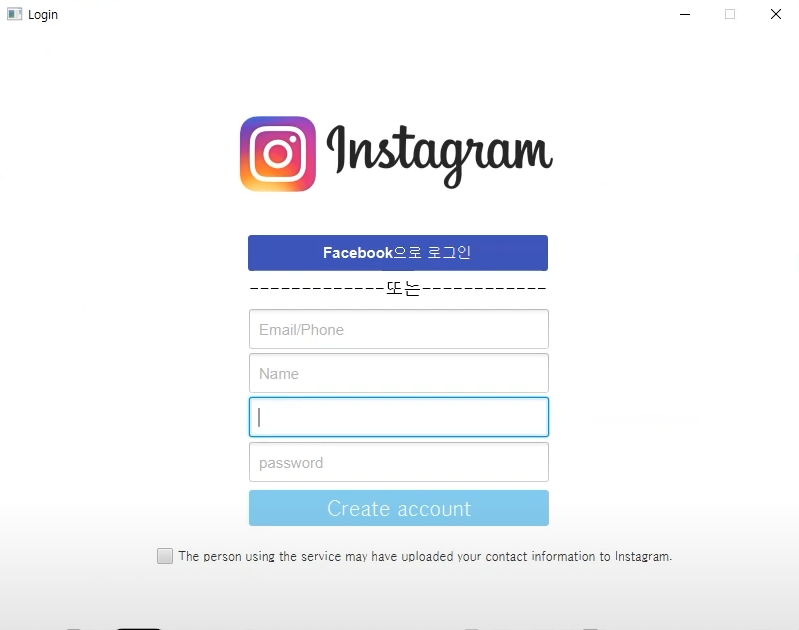
Facebook으로 로그인 클릭

실행코드
application.css
/* JavaFX CSS - Leave this comment until you have at least create one rule which uses -fx-Property */
Login.fxml
<?xml version="1.0" encoding="UTF-8"?>

<?import javafx.scene.control.Button?>
<?import javafx.scene.control.CheckBox?>
<?import javafx.scene.control.DatePicker?>
<?import javafx.scene.control.PasswordField?>
<?import javafx.scene.control.TextField?>
<?import javafx.scene.image.Image?>
<?import javafx.scene.image.ImageView?>
<?import javafx.scene.layout.AnchorPane?>
<?import javafx.scene.text.Font?>
<?import javafx.scene.text.Text?>

<AnchorPane maxHeight="-Infinity" maxWidth="-Infinity" minHeight="-Infinity" minWidth="-Infinity" prefHeight="600.0" prefWidth="800.0" style="-fx-background-color: white;" xmlns="http://javafx.com/javafx/18" xmlns:fx="http://javafx.com/fxml/1" fx:controller="application.LoginController">
   	<children>
      <ImageView fitHeight="84.0" fitWidth="345.0" layoutX="236.0" layoutY="30.0" pickOnBounds="true" preserveRatio="true">
         <image>
            <Image url="@../../../../Downloads/화면%20캡처%202022-07-27%20150030.png" />
         </image>
      </ImageView>
      <TextField layoutX="250.0" layoutY="211.0" prefHeight="40.0" prefWidth="300.0" promptText="E-mail/전화번호">
         <font>
            <Font name="Arial" size="15.0" />
         </font>
      </TextField>
    <Button fx:id="book_login" layoutX="249.0" layoutY="146.0" mnemonicParsing="false" onAction="#movePage" prefHeight="35.0" prefWidth="300.0" style="-fx-background-color: #3F51B5;" text="Facebook으로 로그인" textFill="WHITE">
         <font>
            <Font name="Arial Bold" size="15.0" />
         </font>
      </Button>
      <Text layoutX="382.0" layoutY="205.0" strokeType="OUTSIDE" strokeWidth="0.0" text="또는" wrappingWidth="34.48828125">
         <font>
            <Font size="16.0" />
         </font>
      </Text>
      <Text layoutX="250.0" layoutY="202.0" strokeType="OUTSIDE" strokeWidth="0.0" text="------------------------------            -------------------------------" wrappingWidth="300.0" />
      <Button fx:id="acc_login" layoutX="250.0" layoutY="460.0" mnemonicParsing="false" onAction="#move" prefHeight="35.0" prefWidth="300.0" style="-fx-background-color: skyblue;" text="계정 만들기" textFill="WHITE">
         <font>
            <Font size="20.0" />
         </font>
      </Button>
      <PasswordField layoutX="250.0" layoutY="363.0" prefHeight="40.0" prefWidth="300.0" promptText="비밀번호">
         <font>
            <Font name="Arial" size="15.0" />
         </font>
      </PasswordField>
      <TextField layoutX="250.0" layoutY="264.0" prefHeight="40.0" prefWidth="300.0" promptText="이름">
         <font>
            <Font name="Arial" size="15.0" />
         </font>
      </TextField>
      <CheckBox layoutX="224.0" layoutY="521.0" mnemonicParsing="false" prefHeight="35.0" prefWidth="519.0" text="사용자가 인스타그램에 자신의 개인정보를 업로드 할 수 있습니다" />
      <DatePicker layoutX="250.0" layoutY="314.0" prefHeight="40.0" prefWidth="300.0" promptText="생일을 입력하세요" />
      <PasswordField layoutX="250.0" layoutY="411.0" prefHeight="40.0" prefWidth="300.0" promptText="비밀번호 확인">
         <font>
            <Font name="Arial" size="15.0" />
         </font>
      </PasswordField>
   </children>
</AnchorPane>
LoginController.java
package application;

import javafx.scene.control.Button;
import java.io.IOException;
import java.net.URL;
import java.util.ResourceBundle;

import javafx.stage.*;

import javafx.animation.Interpolator;
import javafx.animation.KeyFrame;
import javafx.animation.KeyValue;
import javafx.animation.Timeline;
import javafx.event.ActionEvent;
import javafx.fxml.FXML;
import javafx.fxml.FXMLLoader;
import javafx.fxml.Initializable;
import javafx.scene.Node;
import javafx.scene.Parent;
import javafx.scene.Scene;
import javafx.scene.layout.AnchorPane;
import javafx.scene.layout.StackPane;
import javafx.util.Duration;
import javafx.scene.control.Alert;
import javafx.scene.control.TextField;
import javafx.scene.control.Alert.AlertType;

public class LoginController implements Initializable{

	@FXML Button book_login;
	@FXML Button acc_login;

	@Override
	public void initialize(URL location, ResourceBundle resources) {
		// TODO Auto-generated method stub

	}
	// 버튼 클릭시 하는 행동
		public void movePage() {

			try {
				// 컨트롤 + 레이아웃
				Parent sub = FXMLLoader.load(getClass().getResource("Register.fxml"));

				// 씬에 추가
				Scene scene = new Scene(sub);
				// 씬을 스테이지에 추가
				//Stage stage = (Stage) btn.getScene().getWindow();
				Stage stage = new Stage();
				stage.setScene(scene);
				// 스테이지 설정
				stage.setTitle("Register");
				stage.setResizable(false);
				// 스테이지 보여주기
				stage.show();

				Stage root = (Stage) book_login.getScene().getWindow(); //현재 윈도우를 가져온다는 뜻
				root.close();
			} catch (IOException e) {
				// TODO Auto-generated catch block
				e.printStackTrace();
			}

		}
		public void move() {

			try {
				// 컨트롤 + 레이아웃
				Parent sub = FXMLLoader.load(getClass().getResource("page.fxml"));

				// 씬에 추가
				Scene scene = new Scene(sub);
				// 씬을 스테이지에 추가
				//Stage stage = (Stage) btn.getScene().getWindow();
				Stage stage = new Stage();
				stage.setScene(scene);
				// 스테이지 설정
				stage.setTitle("Page");
				stage.setResizable(false);
				// 스테이지 보여주기
				stage.show();

				Stage root = (Stage) acc_login.getScene().getWindow(); //현재 윈도우를 가져온다는 뜻
				root.close();
			} catch (IOException e) {
				// TODO Auto-generated catch block
				e.printStackTrace();
			}

		}


	}
Main.java
package application;

import javafx.application.Application;
import javafx.stage.Stage;
import javafx.scene.Parent;
import javafx.scene.Scene;
import javafx.scene.layout.BorderPane;
import javafx.fxml.FXMLLoader;


@SuppressWarnings("unused")
public class Main extends Application {
	@Override
	public void start(Stage primaryStage) {
		try {
            //컨트롤 + 레이아웃
		      Parent root = FXMLLoader.load(getClass().getResource("Start.fxml"));
		      Scene scene = new Scene(root);
		     //Scene scene = new Scene(root,400,400);
            // 씬을 스테이지에 추가
			primaryStage.setScene(scene);
            // 씬을 보여주기
			primaryStage.show();
		} catch(Exception e) {
			e.printStackTrace();
		}
	}

	public static void main(String[] args) {
		launch(args);
	}
}
Page.fxml
<?xml version="1.0" encoding="UTF-8"?>

<?import javafx.scene.control.Button?>
<?import javafx.scene.control.CheckBox?>
<?import javafx.scene.control.DatePicker?>
<?import javafx.scene.control.PasswordField?>
<?import javafx.scene.control.TextField?>
<?import javafx.scene.image.Image?>
<?import javafx.scene.image.ImageView?>
<?import javafx.scene.layout.AnchorPane?>
<?import javafx.scene.text.Font?>
<?import javafx.scene.text.Text?>

<AnchorPane maxHeight="-Infinity" maxWidth="-Infinity" minHeight="-Infinity" minWidth="-Infinity" prefHeight="600.0" prefWidth="800.0" style="-fx-background-color: white;" xmlns="http://javafx.com/javafx/18" xmlns:fx="http://javafx.com/fxml/1" fx:controller="application.LoginController">
   	<children>
      <ImageView fitHeight="84.0" fitWidth="345.0" layoutX="236.0" layoutY="30.0" pickOnBounds="true" preserveRatio="true">
         <image>
            <Image url="@../../../../Downloads/화면%20캡처%202022-07-27%20150030.png" />
         </image>
      </ImageView>
      <TextField layoutX="250.0" layoutY="211.0" prefHeight="40.0" prefWidth="300.0" promptText="E-mail/전화번호">
         <font>
            <Font name="Arial" size="15.0" />
         </font>
      </TextField>
    <Button fx:id="book_login" layoutX="443.0" layoutY="133.0" mnemonicParsing="false" onAction="#movePage" prefHeight="35.0" prefWidth="300.0" style="-fx-background-color: #3F51B5;" text="Facebook으로 로그인" textFill="WHITE">
         <font>
            <Font name="Arial Bold" size="15.0" />
         </font>
      </Button>
      <Text layoutX="382.0" layoutY="205.0" strokeType="OUTSIDE" strokeWidth="0.0" text="또는" wrappingWidth="34.48828125">
         <font>
            <Font size="16.0" />
         </font>
      </Text>
      <Text layoutX="250.0" layoutY="202.0" strokeType="OUTSIDE" strokeWidth="0.0" text="------------------------------            -------------------------------" wrappingWidth="300.0" />
      <Button fx:id="acc_login" layoutX="351.0" layoutY="451.0" mnemonicParsing="false" onAction="#move" prefHeight="35.0" prefWidth="300.0" style="-fx-background-color: skyblue;" text="계정 만들기" textFill="WHITE">
         <font>
            <Font size="20.0" />
         </font>
      </Button>
      <PasswordField layoutX="250.0" layoutY="363.0" prefHeight="40.0" prefWidth="300.0" promptText="비밀번호">
         <font>
            <Font name="Arial" size="15.0" />
         </font>
      </PasswordField>
      <TextField layoutX="250.0" layoutY="264.0" prefHeight="40.0" prefWidth="300.0" promptText="이름">
         <font>
            <Font name="Arial" size="15.0" />
         </font>
      </TextField>
      <CheckBox layoutX="224.0" layoutY="521.0" mnemonicParsing="false" prefHeight="35.0" prefWidth="519.0" text="사용자가 인스타그램에 자신의 개인정보를 업로드 할 수 있습니다" />
      <DatePicker layoutX="250.0" layoutY="314.0" prefHeight="40.0" prefWidth="300.0" promptText="생일을 입력하세요" />
      <PasswordField layoutX="250.0" layoutY="411.0" prefHeight="40.0" prefWidth="300.0" promptText="비밀번호 확인">
         <font>
            <Font name="Arial" size="15.0" />
         </font>
      </PasswordField>
   </children>
</AnchorPane>
PageController.java
package application;

import javafx.scene.control.Button;
import java.io.IOException;
import java.net.URL;
import java.util.ResourceBundle;

import javafx.stage.*;

import javafx.animation.Interpolator;
import javafx.animation.KeyFrame;
import javafx.animation.KeyValue;
import javafx.animation.Timeline;
import javafx.event.ActionEvent;
import javafx.fxml.FXML;
import javafx.fxml.FXMLLoader;
import javafx.fxml.Initializable;
import javafx.scene.Node;
import javafx.scene.Parent;
import javafx.scene.Scene;
import javafx.scene.layout.AnchorPane;
import javafx.scene.layout.StackPane;
import javafx.util.Duration;
import javafx.scene.control.Alert;
import javafx.scene.control.TextField;
import javafx.scene.control.Alert.AlertType;

public class PageController implements Initializable{

	@FXML Button book_login;
	@FXML Button acc_login;

	@Override
	public void initialize(URL location, ResourceBundle resources) {
		// TODO Auto-generated method stub

	}
	// 버튼 클릭시 하는 행동
		public void movePage() {

			try {
				// 컨트롤 + 레이아웃
				Parent sub = FXMLLoader.load(getClass().getResource("Register.fxml"));

				// 씬에 추가
				Scene scene = new Scene(sub);
				// 씬을 스테이지에 추가
				//Stage stage = (Stage) btn.getScene().getWindow();
				Stage stage = new Stage();
				stage.setScene(scene);
				// 스테이지 설정
				stage.setTitle("Register");
				stage.setResizable(false);
				// 스테이지 보여주기
				stage.show();

				Stage root = (Stage) book_login.getScene().getWindow(); //현재 윈도우를 가져온다는 뜻
				root.close();
			} catch (IOException e) {
				// TODO Auto-generated catch block
				e.printStackTrace();
			}

		}
		public void move() {

			try {
				// 컨트롤 + 레이아웃
				Parent sub = FXMLLoader.load(getClass().getResource("page.fxml"));

				// 씬에 추가
				Scene scene = new Scene(sub);
				// 씬을 스테이지에 추가
				//Stage stage = (Stage) btn.getScene().getWindow();
				Stage stage = new Stage();
				stage.setScene(scene);
				// 스테이지 설정
				stage.setTitle("Page");
				stage.setResizable(false);
				// 스테이지 보여주기
				stage.show();

				Stage root = (Stage) acc_login.getScene().getWindow(); //현재 윈도우를 가져온다는 뜻
				root.close();
			} catch (IOException e) {
				// TODO Auto-generated catch block
				e.printStackTrace();
			}

		}


	}
Register.fxml
<?xml version="1.0" encoding="UTF-8"?>

<?import javafx.scene.control.Button?>
<?import javafx.scene.control.PasswordField?>
<?import javafx.scene.control.TextField?>
<?import javafx.scene.image.Image?>
<?import javafx.scene.image.ImageView?>
<?import javafx.scene.layout.AnchorPane?>
<?import javafx.scene.layout.StackPane?>
<?import javafx.scene.text.Text?>

<StackPane maxHeight="-Infinity" maxWidth="-Infinity" minHeight="-Infinity" minWidth="-Infinity" prefHeight="400.0" prefWidth="600.0" xmlns="http://javafx.com/javafx/18" xmlns:fx="http://javafx.com/fxml/1" fx:controller="application.RegisterController">
   <children>
      <AnchorPane prefHeight="600.0" prefWidth="800.0" style="-fx-background-color: #3F51B5;">
         <children>
            <ImageView fitHeight="70.0" fitWidth="70.0" layoutX="265.0" layoutY="64.0" pickOnBounds="true" preserveRatio="true">
               <image>
                  <Image url="@../../../../Desktop/icons8_facebook_filled_100px_1.png" />
               </image>
            </ImageView>
            <TextField layoutX="175.0" layoutY="185.0" prefHeight="30.0" prefWidth="250.0" promptText="E-mail/전화번호를 입력하세요" />
            <PasswordField layoutX="175.0" layoutY="234.0" prefHeight="30.0" prefWidth="250.0" promptText="비밀번호를 입력하세요" />
            <Button fx:id="book_login" layoutX="173.0" layoutY="288.0" mnemonicParsing="false" onAction="#movePage" prefHeight="30.0" prefWidth="250.0" style="-fx-background-color: GREEN;" text="로그인" textFill="WHITE" />
            <Text fill="WHITE" layoutX="115.0" layoutY="344.0" strokeType="OUTSIDE" strokeWidth="0.0" text="도움이 필요하신가요?" />
            <Button fx:id="back" layoutX="382.0" layoutY="328.0" mnemonicParsing="false" onAction="#move_1" style="-fx-background-color: none;" text="이전 화면으로 돌아가기" textFill="WHITE" />
         </children>
      </AnchorPane>
   </children>
</StackPane>
RegisterController.java
package application;

import javafx.scene.control.Button;
import java.io.IOException;
import java.net.URL;
import java.util.ResourceBundle;

import javafx.stage.*;

import javafx.animation.Interpolator;
import javafx.animation.KeyFrame;
import javafx.animation.KeyValue;
import javafx.animation.Timeline;
import javafx.event.ActionEvent;
import javafx.fxml.FXML;
import javafx.fxml.FXMLLoader;
import javafx.fxml.Initializable;
import javafx.scene.Node;
import javafx.scene.Parent;
import javafx.scene.Scene;
import javafx.scene.layout.AnchorPane;
import javafx.scene.layout.StackPane;
import javafx.util.Duration;
import javafx.scene.control.Alert;
import javafx.scene.control.TextField;
import javafx.scene.control.Alert.AlertType;

public class RegisterController implements Initializable{

	@FXML Button book_login;
	@FXML Button back;

	@Override
	public void initialize(URL location, ResourceBundle resources) {
		// TODO Auto-generated method stub

	}
	// 버튼 클릭시 하는 행동
		public void movePage() {

			try {
				// 컨트롤 + 레이아웃
				Parent sub = FXMLLoader.load(getClass().getResource("Page.fxml"));
				// 씬에 추가
				Scene scene = new Scene(sub);
				// 씬을 스테이지에 추가
				//Stage stage = (Stage) btn.getScene().getWindow();
				Stage stage = new Stage();
				stage.setScene(scene);
				// 스테이지 설정
				stage.setTitle("Login");
				stage.setResizable(false);
				// 스테이지 보여주기
				stage.show();

				Stage root = (Stage) book_login.getScene().getWindow(); //현재 윈도우를 가져온다는 뜻
				root.close();
			} catch (IOException e) {
				// TODO Auto-generated catch block
				e.printStackTrace();
			}

		}
		public void move_1() {

			try {
				// 컨트롤 + 레이아웃
				Parent sub = FXMLLoader.load(getClass().getResource("Login.fxml"));

				// 씬에 추가
				Scene scene = new Scene(sub);
				// 씬을 스테이지에 추가
				//Stage stage = (Stage) btn.getScene().getWindow();
				Stage stage = new Stage();
				stage.setScene(scene);
				// 스테이지 설정
				stage.setTitle("Login");
				stage.setResizable(false);
				// 스테이지 보여주기
				stage.show();

				Stage root = (Stage) back.getScene().getWindow(); //현재 윈도우를 가져온다는 뜻
				root.close();
			} catch (IOException e) {
				// TODO Auto-generated catch block
				e.printStackTrace();
			}

		}
	}
Start.fxml
<?xml version="1.0" encoding="UTF-8"?>

<?import javafx.scene.control.Button?>
<?import javafx.scene.control.ButtonBar?>
<?import javafx.scene.image.Image?>
<?import javafx.scene.image.ImageView?>
<?import javafx.scene.layout.AnchorPane?>
<?import javafx.scene.layout.StackPane?>
<?import javafx.scene.text.Font?>

<StackPane fx:id="container" xmlns="http://javafx.com/javafx/18" xmlns:fx="http://javafx.com/fxml/1" fx:controller="application.StartController">
   <children>
      <AnchorPane id="AnchorPn" maxHeight="-Infinity" maxWidth="-Infinity" minHeight="-Infinity" minWidth="-Infinity" prefHeight="600.0" prefWidth="800.0" style="-fx-background-color: white;" stylesheets="@../css/Stylesheet.css">
         <children>
            <ButtonBar layoutX="298.0" layoutY="259.0" prefHeight="33.0" prefWidth="150.0" />
          <Button fx:id="btn" layoutX="330.0" layoutY="448.0" mnemonicParsing="false" onAction="#movePage" prefHeight="26.0" prefWidth="141.0" style="-fx-border-width: 3px 3px 3px 3px; -fx-background-color: none; -fx-border-radius: 5px 5px 5px 5px; -fx-border-color: blue;" text="로그인/회원가입" textFill="#2600ff">
               <font>
                  <Font name="Arial Bold" size="15.0" />
               </font>
            </Button>
            <ImageView fitHeight="568.0" fitWidth="256.0" layoutX="76.0" layoutY="19.0" pickOnBounds="true" preserveRatio="true">
               <image>
                  <Image url="@../../../../../Screenshot_20220728-083609_Instagram.jpg" />
               </image>
            </ImageView>
            <ImageView fx:id="fa" fitHeight="89.0" fitWidth="106.0" layoutX="342.0" layoutY="212.0" pickOnBounds="true" preserveRatio="true">
               <image>
                  <Image url="@../../../../Downloads/화면%20캡처%202022-07-27%20145404.png" />
               </image>
            </ImageView>
         </children>
      </AnchorPane>
   </children>
</StackPane>
StartController.java
package application;

import javafx.scene.control.Button;
import java.io.IOException;
import java.net.URL;
import java.util.ResourceBundle;

import javafx.stage.*;

import javafx.animation.Interpolator;
import javafx.animation.KeyFrame;
import javafx.animation.KeyValue;
import javafx.animation.Timeline;
import javafx.event.ActionEvent;
import javafx.fxml.FXML;
import javafx.fxml.FXMLLoader;
import javafx.fxml.Initializable;
import javafx.scene.Node;
import javafx.scene.Parent;
import javafx.scene.Scene;
import javafx.scene.layout.AnchorPane;
import javafx.scene.layout.StackPane;
import javafx.util.Duration;
import javafx.scene.control.Alert;
import javafx.scene.control.TextField;
import javafx.scene.control.Alert.AlertType;

public class StartController implements Initializable{

	@FXML Button btn;

	@Override
	public void initialize(URL location, ResourceBundle resources) {
		// TODO Auto-generated method stub

	}
	// 버튼 클릭시 하는 행동
		public void movePage() {

			try {
				// 컨트롤 + 레이아웃
				Parent sub = FXMLLoader.load(getClass().getResource("Login.fxml"));
				// 씬에 추가
				Scene scene = new Scene(sub);
				// 씬을 스테이지에 추가
				//Stage stage = (Stage) btn.getScene().getWindow();
				Stage stage = new Stage();
				stage.setScene(scene);
				// 스테이지 설정
				stage.setTitle("Login");
				stage.setResizable(false);
				// 스테이지 보여주기
				stage.show();

				Stage root = (Stage) btn.getScene().getWindow(); //현재 윈도우를 가져온다는 뜻
				root.close();
			} catch (IOException e) {
				// TODO Auto-generated catch block
				e.printStackTrace();
			}

		}
	}